
We ran RecurPost through a 14-day test across multiple client accounts. Here is everything it does brilliantly, a few things it does not, and whether it is actually worth switching.
Three agency owners in our network quietly swapped their scheduling tool within the same two-week window. None of them posted about it publicly. We only figured it out when their client content started appearing through a platform I barely recognised. So we signed up, ran a proper test, and the more we dug in, the more we understood why nobody was talking about it: you do not advertise your competitive edge to competitors.
The tool is RecurPost. Founded in 2016, it now serves over 100,000 brands and agencies across 163 countries, and has helped push more than 60 million posts live. But those numbers only tell you it works. They do not tell you why it works differently from every other scheduler you have already tried and eventually outgrown.
So let us do that. Also, watch the full tutorial on YouTube and get the most of it from Recurpost.
The Core Idea That Changes Everything
Most social media schedulers operate on a simple, exhausting logic: you queue posts, they fire in order, and when the queue runs empty, your feed goes silent. You are constantly refilling a bucket with holes in it. RecurPost looked at that problem and built something structurally different, redefining how efficient social media management should actually work.
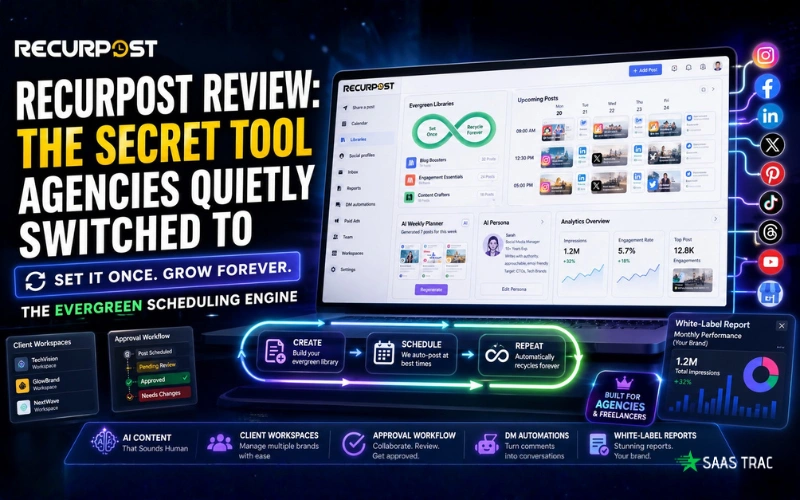
The platform is built around evergreen content libraries. Instead of scheduling a post that fires once and disappears into the archive, you build a library of posts, your best evergreen content, and RecurPost cycles through it automatically on a rhythm you define. When it reaches the last post, it starts from the top again. Your social media presence never goes dark, even when you are on holiday, deep in a client project, or simply not thinking about social media management at all.
“Most tools solve scheduling. RecurPost solves the exhausting loop of having to refill your content queue from scratch every single week.”
This sounds like a small distinction. The operational implications are not. For agencies focused on large-scale social media management, it means you build the evergreen library once—product benefits, FAQs, testimonials, timeless insights—and it runs indefinitely without you touching it again. You only intervene when you want to update something. The machine handles everything else. That shift from weekly content maintenance to occasional content oversight is the true social media management advantage.
Getting Started Is Refreshingly Fast
Onboarding takes under ten minutes. You select your role, blogger, freelancer, agency, or brand, and the interface calibrates its suggestions to match. Connecting profiles is standard OAuth: authorise each platform once, and the accounts populate your sidebar immediately. Facebook, Instagram, LinkedIn, X, Pinterest, TikTok, YouTube, Threads, and Google Business Profile are all supported from day one.
That last platform deserves a brief mention. Google Business Profile scheduling is genuinely rare in this category and a real differentiator for agencies managing local businesses. If you have clients who depend on local SEO, the ability to schedule GBP posts from the same dashboard as everything else removes a surprisingly frustrating daily context-switch.
The dashboard itself is clean without feeling stripped back. There is no overwhelming settings wall on your first login, no guided setup call required before you can post anything. You can be scheduling within minutes. The Library system, which is where the real power lives, takes an honest hour to fully understand, but that investment pays back quickly and repeatedly.
The Features That Actually Matter in Practice
Building Your Evergreen Library
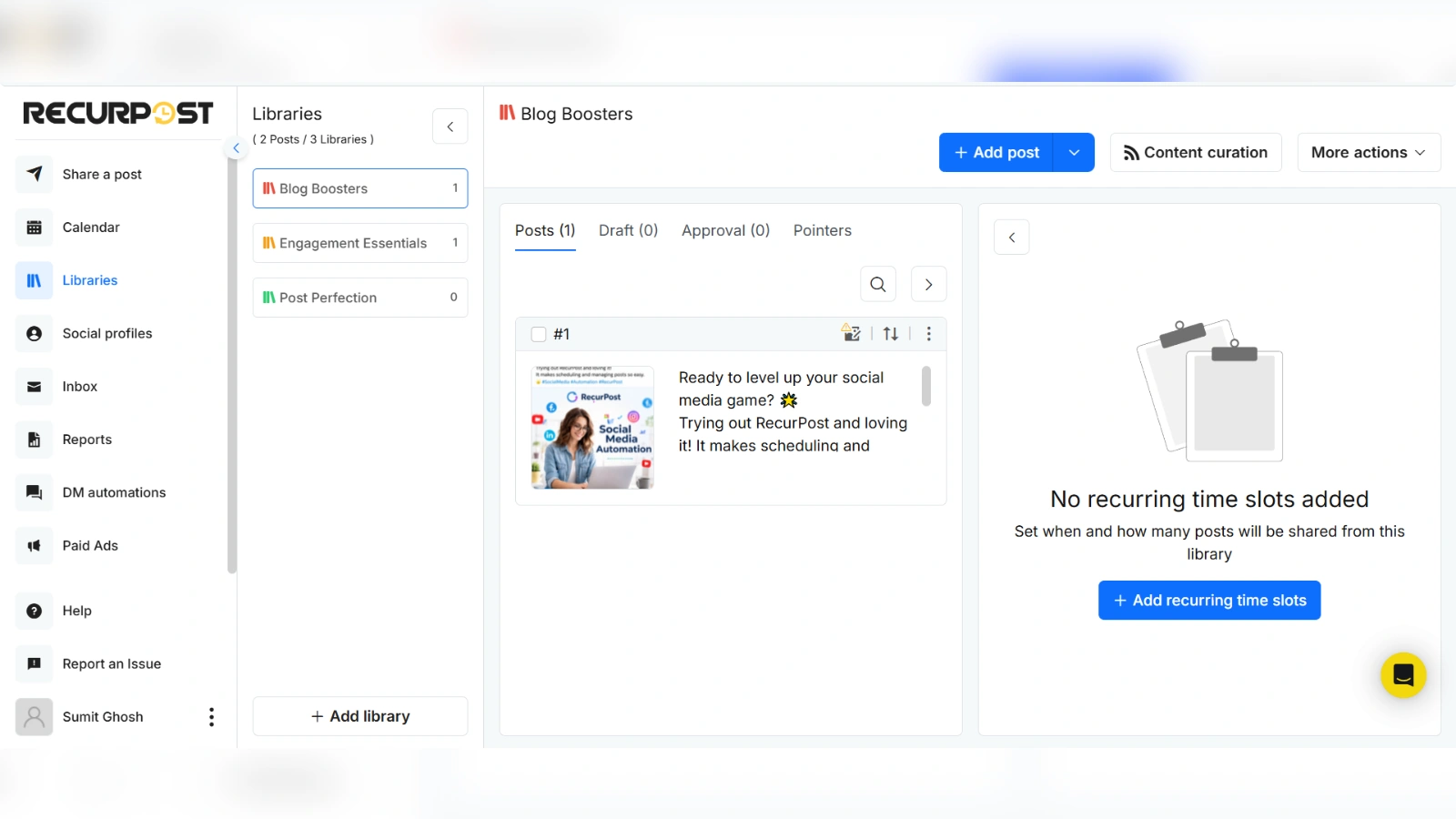
Creating a library is intuitive once you understand the architecture. You can build one from scratch or start from an industry-specific template, select the Blogging template, and it instantly creates sub-libraries for Blog Boosters, Engagement Essentials, and Content Crafters. Add your posts, define recurring time slots, assign the library to one or more social profiles, and set your frequency. Weekly, monthly, or a custom interval, your choice. RecurPost’s algorithm can also auto-schedule for optimal engagement times if you would rather not think about the specifics.
The RSS feed integration is worth flagging here, too. Connect your website URL, and RecurPost automatically pulls new blog posts into your library rotation the moment they are published. No manual steps, no copy-paste loop. For content-heavy brands, this single feature removes a repetitive weekly task that feels small but compounds into hours over a year.
Single Posts, the Calendar, and Client Approvals
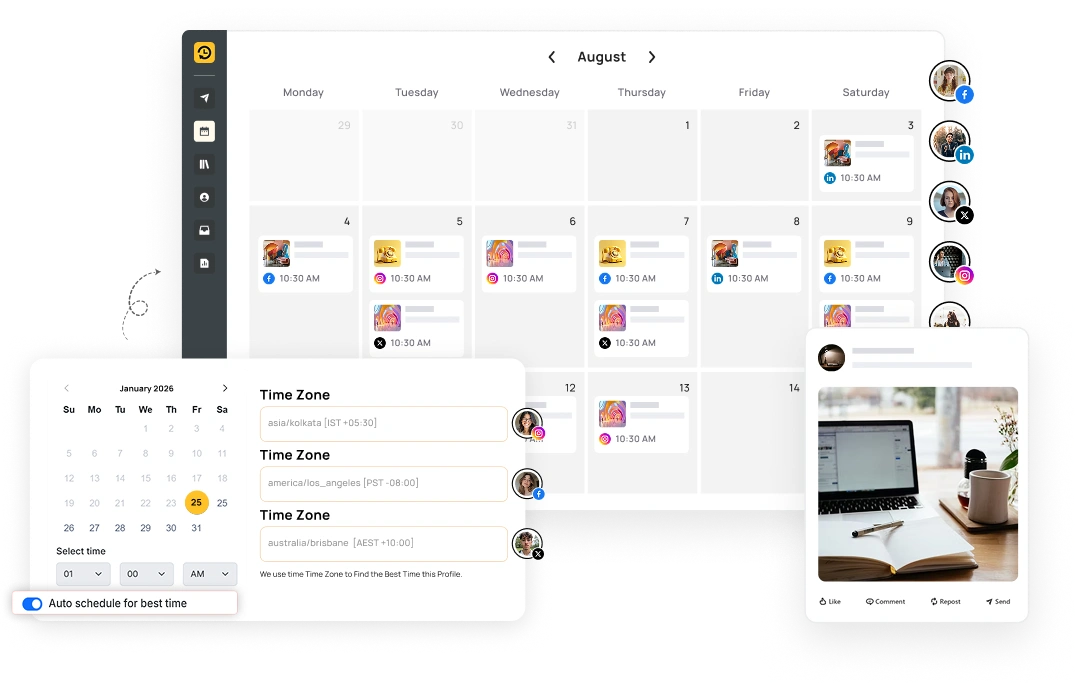
Beyond the library engine, single-post creation is exactly what you would want from a modern tool. You select your target profiles, write your content, and use the per-platform customisation feature to tailor each caption, a longer, richer description for LinkedIn, a punchy hashtag-forward version for Instagram, all from the same window. A live social preview updates in real time, so you see precisely how the post will render on each platform before it ever goes out.
The content calendar gives you a unified view of everything scheduled across all profiles. Drag-and-drop rescheduling works cleanly; move a post to a different date, and it updates instantly. For agencies, the collaboration layer built into the calendar is the standout detail: clients and team members can review and approve posts directly within the shared timeline. Each post carries a live status: Approved, Pending, or Needs Adjustment, so everyone knows exactly what is ready without a single email chain or shared Google Sheet with colour codes only you understand.
The AI Suite: Genuinely Useful, Not Just a Checkbox Feature
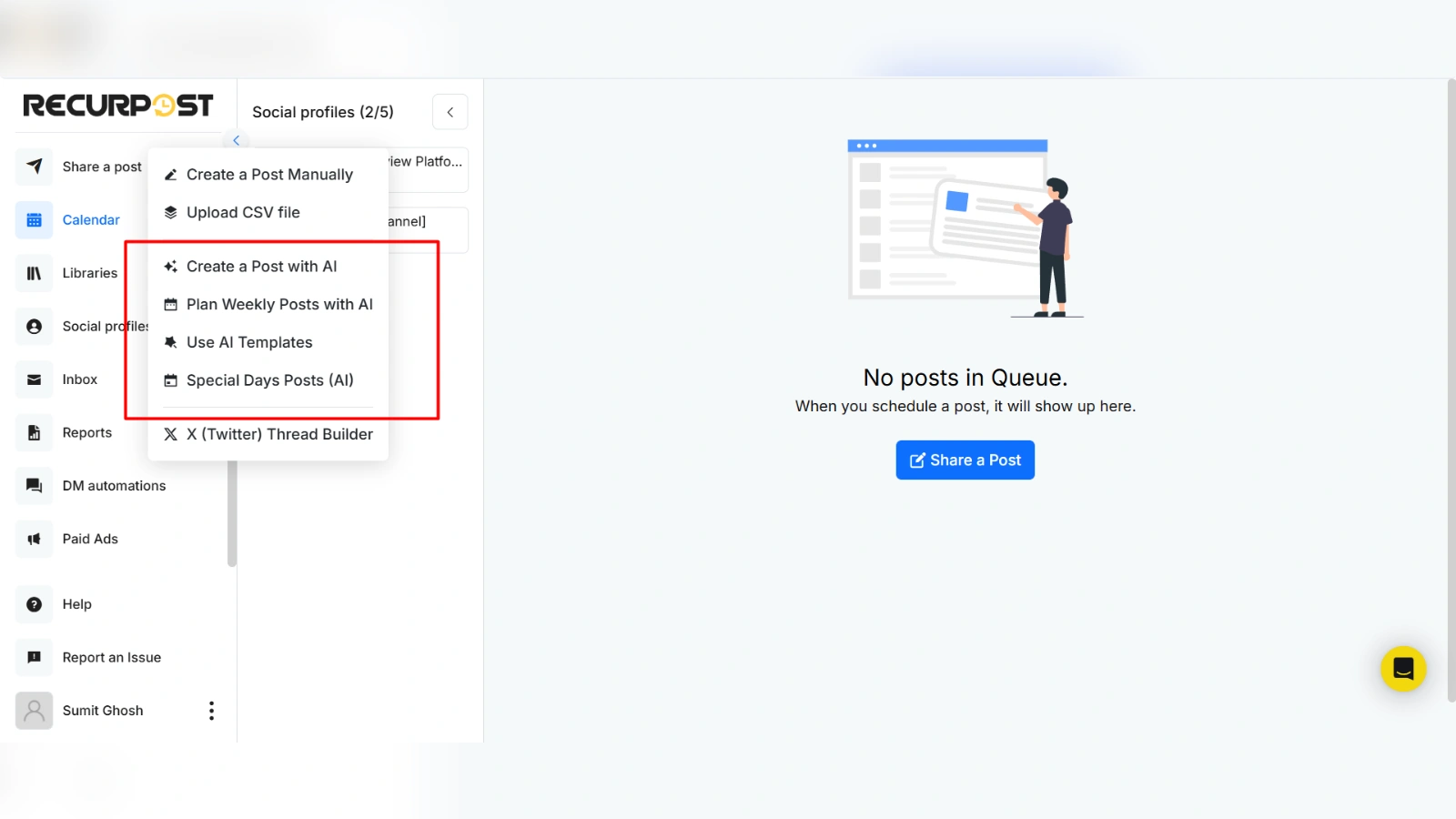
RecurPost’s AI tools go meaningfully further than the basic “generate a caption” feature that every tool now offers as a selling point. The centrepiece is the Plan Weekly Posts with AI feature. You drop in a seed idea, define a tone, and specify how many posts you want per day for the coming week. In roughly 30 seconds, you have finished, formatted posts with hashtags and calls to action that are ready to schedule. Not rough drafts requiring significant editing, genuinely usable posts.
The detail most users miss is the Persona feature nested inside the weekly planner. Rather than leaving the tone on a generic setting, you can define a specific writing character, give the AI a name, a professional background, a communication style, and a target audience. Something like: “You are Sarah, a Social Media Manager with ten years of experience who writes with authority but uses emojis to stay approachable, targeting CTOs at mid-sized tech companies.” The difference in output quality compared to a generic prompt is stark. It reads like a person, not a content machine.
Worth knowing: The Special Days AI automatically surfaces upcoming holidays and generates platform-ready posts for whichever you select. Save them to a library, and they activate automatically next year. Over time, you build a seasonal content archive that compounds its value each cycle. You do the work once, and it pays off annually.
AI image generation is built directly into the post editor as well. The quality relationship is direct: specific, detailed prompts describing mood, brand context, and visual composition produce genuinely usable royalty-free images. Vague prompts produce vague images. That is less a criticism of the tool and more a reminder that AI image generation rewards the same specificity that good creative briefs always have.
Workspaces: Where It Becomes a Real Agency Tool
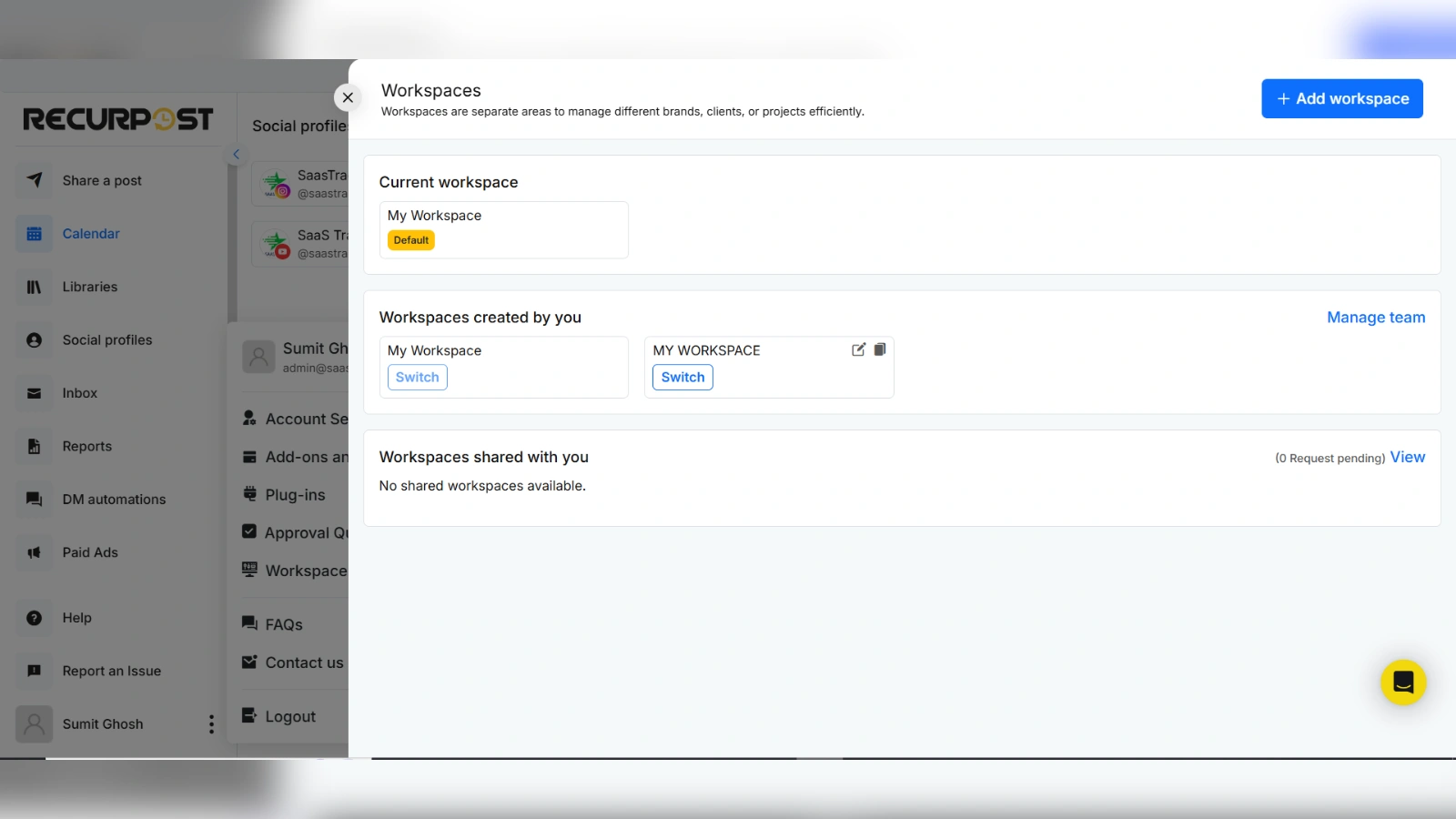
Workspaces are what elevate RecurPost from a solid personal scheduler into something agencies can genuinely build a workflow around. Each workspace is a completely isolated environment: its own social profiles, content libraries, schedules, analytics, and team access. Your editor for Client A is never even visible to Client B’s account. Clients themselves can be invited directly into their workspace to review, comment, and approve content in real time.
The Custom Fields feature is an underappreciated efficiency gain for anyone managing multiple brands. Build one post template that reads “Check out our latest at [Company Name]” and define a different field value for each social profile. When the post goes out, RecurPost substitutes the correct name automatically. Managing fifty brands from a single content template is a real operational win at scale; it is not theoretical, it works exactly as described.
Analytics, White-Label Reports, and the AI Assistant
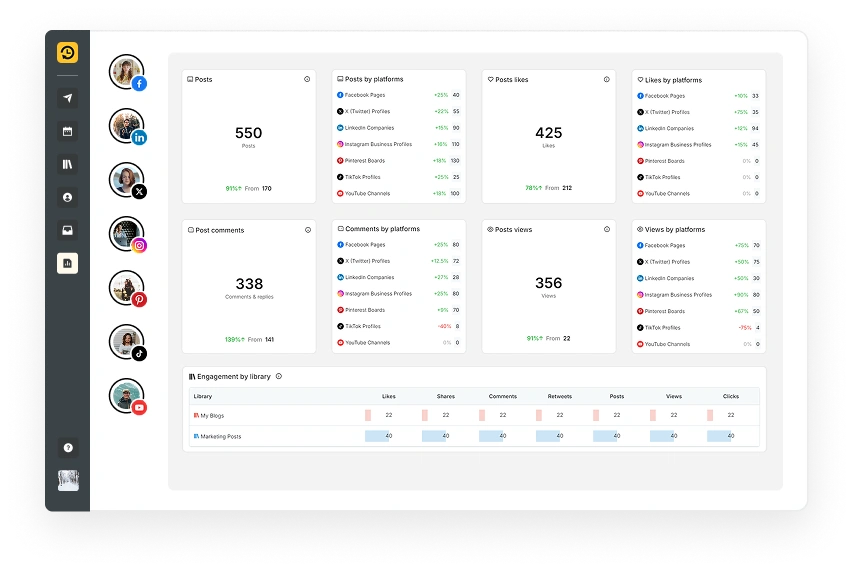
The reporting section covers impressions, engagement rates, audience demographics, top-performing posts, and best-time-to-post analysis drawn from your actual account history rather than generic industry averages. The AI assistant within reports is a practical time-saver: type a plain-language question, “Which posts performed best last Tuesday?”, and receive a plain-language answer. You stop staring at graphs trying to interpret what they mean.
For agencies, the white-label reporting feature turns analytics into a polished client deliverable. Apply your branding, automate delivery on a schedule, and present data-rich reports as your own professionally produced work. RecurPost handles the collection and synthesis; you handle the relationship.
Instagram DM Automations: A Lead Generation Layer Most Tools Skip
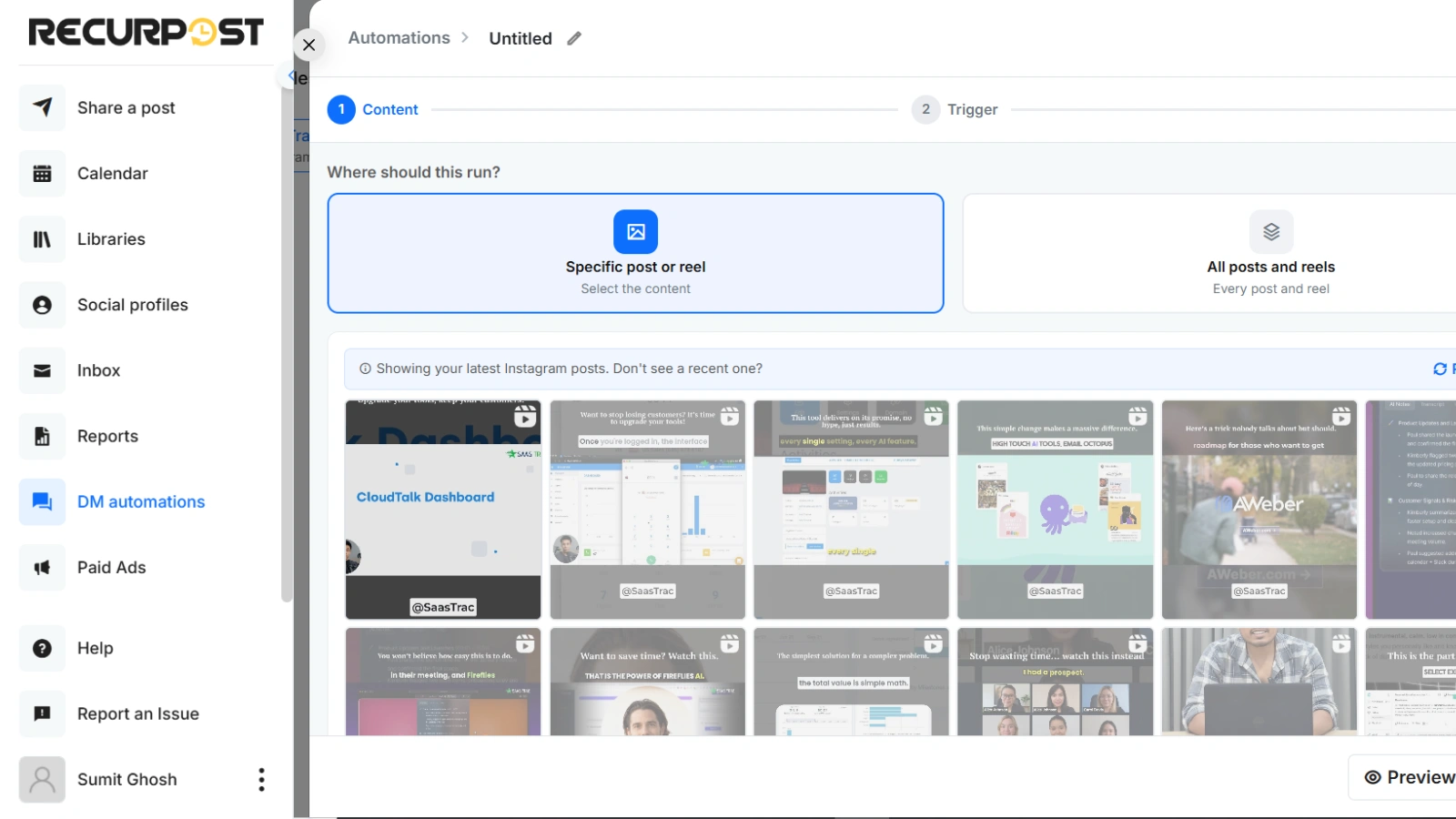
RecurPost includes comment-triggered DM automation for Instagram that most scheduling tools have simply not built. Define a keyword trigger. Anyone who comments that word on your post automatically receives a private message with your custom content, link, and call-to-action button. You can require them to follow your account first, and you can load multiple public reply variations to keep the engagement looking natural rather than automated. A simulation mode lets you walk through the entire automation on a mobile mockup before activating it, a small feature that prevents real embarrassment in production.
Pricing: One of RecurPost’s Best Arguments
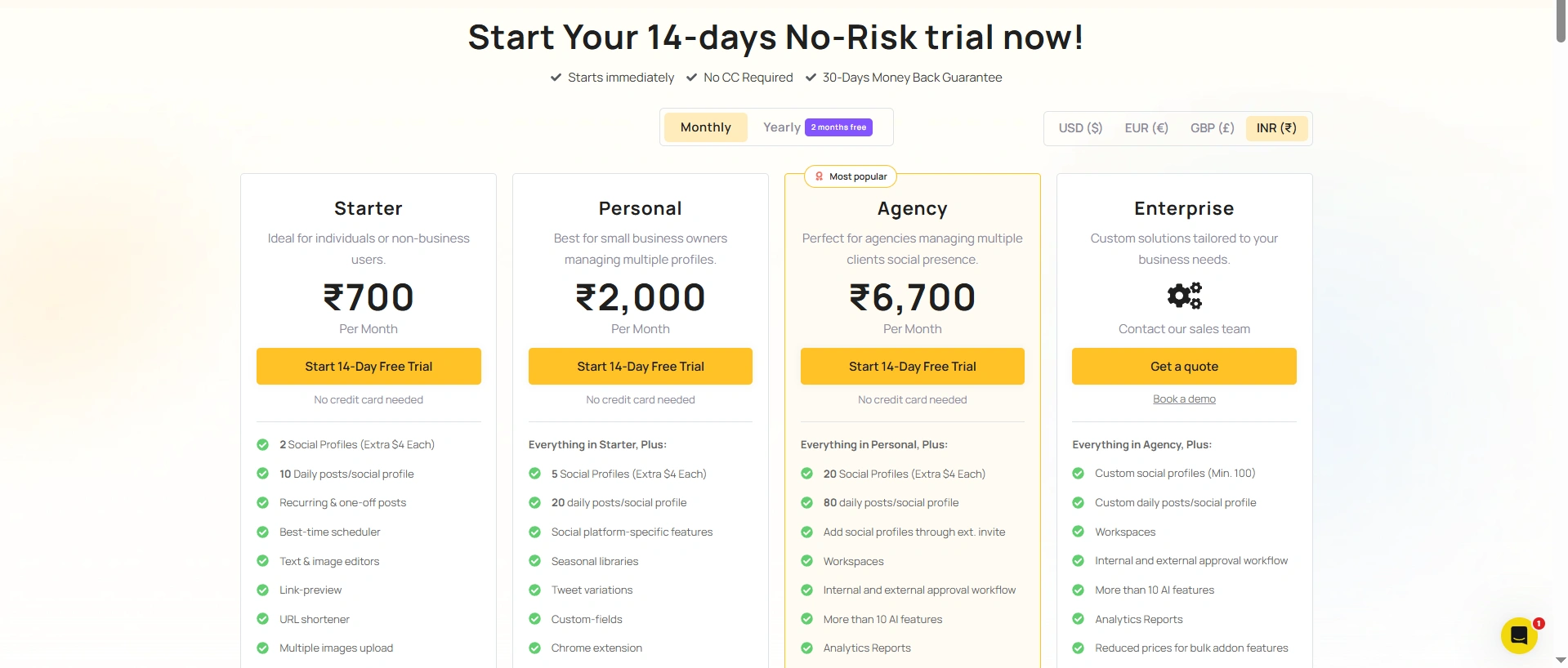
All plans include a 14-day free trial with no credit card required. The pricing is genuinely accessible for the capabilities on offer, and annual billing unlocks meaningful savings. Here are the two plans most readers will land on:
There is also a free tier for up to three profiles and a custom Enterprise plan for large operations. RecurPost periodically releases lifetime deals through AppSumo, worth monitoring if you prefer a one-time payment. Annual plans typically save 35 to 40 percent over monthly billing.
For context: Hootsuite’s comparable tier starts at $99 per month, covers fewer profiles, and has no native evergreen recycling whatsoever. RecurPost is not a budget tool trying to punch above its weight; it is a capable, professionally built platform that happens to be priced accessibly.
Best RecurPost Alternatives Worth Considering
While RecurPost offers impressive evergreen scheduling and agency-focused tools, it may not be the perfect fit for every business. Depending on your budget, team size, or need for advanced features like social listening, collaboration, or broader automation, several alternatives deserve consideration.
- Social Champ – A powerful option with bulk scheduling, evergreen recycling, AI content creation, social inbox, white-label reports, and advanced agency workflows.
- Buffer – Ideal for creators and small businesses seeking simplicity and ease of use.
- SocialBee – Strong automation with category-based scheduling and evergreen management.
- Later – A visually focused social media management platform built especially for Instagram-first brands, creators, and eCommerce businesses.
- Hootsuite– Enterprise-level platforms offering deeper analytics, CRM integrations, and social listening capabilities.
The Honest Pros and Cons
What Works Well
The evergreen library system genuinely delivers on its promise; it is the most impactful single feature in any scheduling tool we have tested. Client workspaces are clean, professionally isolated, and scalable. White-label reports with the built-in AI assistant save agencies real hours every month. Google Business Profile support is rare and consistently valuable for local clients. DM automations add a lead capture layer that competitors simply do not offer. The AI Weekly Planner with Persona-based content produces on-brand posts that read as people wrote them. And the post reliability engine, which catches over 850 types of API errors before they break your scheduled content, means your clients never wake up to a failed post you did not know about.
Where It Falls Short
The library logic takes genuine time to internalise; most first-time users underuse it simply because the concept is new. AI image quality scales directly with prompt quality; generic inputs still produce generic outputs. LinkedIn Paid Ads support is still listed as coming soon rather than live. The mobile app lags noticeably behind the desktop experience. And for teams that need enterprise social listening, deep CRM integration, or community management at scale, this is not the right tool; those workflows need platforms built specifically around them.
Who Should Actually Use RecurPost?
Freelance social media managers handling four to fifteen clients at once will find that RecurPost directly solves their biggest weekly friction point, the constant scramble to keep every client feed active, consistent, and looking intentional. The workspace system, combined with evergreen libraries, turns what used to be a Monday morning panic into a set-and-monitor workflow.
Marketing agencies with growing client rosters will see fast ROI from the white-label reporting, team permissions, bulk scheduling, and custom fields. The platform scales with you rather than demanding a migration to a different tool once you hit a certain volume.
Founders and solopreneurs who understand the compounding value of consistent social media presence but simply cannot afford to spend two hours a day maintaining it will find the library system fits their lives. Build it once, point it at your profiles, and let it run while you focus on actually building your business.
RecurPost is a harder sell for social media teams that need deep community management, enterprise-level social listening, or complex paid campaign management built natively into the same platform. Those use cases exist, and specialist tools serve them better. But if your primary challenge is keeping multiple brands posting consistently and professionally without burning out your team, RecurPost was built for exactly that problem.
Quick pricing reality check: The Agency plan at $79/month does the heavy lifting of tools that charge $250 to $400 per month. If you manage more than three clients actively, the white-label reports and workspace isolation justify the cost within the first billing cycle.
Final Verdict
Recommended, especially if you manage content for others
RecurPost earns its ratings honestly. The evergreen library system is not a marketing hook; it is a genuine architectural rethink of how social media scheduling should work, and once you have built your first two or three libraries, the time savings compound every single week without additional effort.
The AI content suite is solid and clearly improving with each update cycle. The agency infrastructure, workspaces, white-label reports, custom fields, and team access are genuinely production-grade and not just a pro-plan checkbox. The 4.6 on G2 and 4.8 on Capterra, across a user base that has been around since 2016, reflect a tool that does what it says and does it consistently. Those scores do not happen by accident.
If your current workflow involves manually queuing posts every week, sharing login credentials with clients, and occasionally apologising for feeds that went quiet during a busy stretch, RecurPost solves all three of those problems with one subscription. Start the 14-day free trial, build one library, and give it 48 hours. The agencies quietly switching to it are doing so for a reason, and now you know what it is.
Want more honest SaaS reviews, growth tools, and software breakdowns?
[Explore More Expert Reviews on SaaStrac →]
Frequently Asked Questions
1. Is RecurPost worth it for agencies managing multiple client accounts?
Yes, RecurPost is especially valuable for agencies due to its workspace system, evergreen content libraries, white-label reports, and client approval workflows. It significantly reduces repetitive scheduling tasks while improving operational efficiency.
2. What makes RecurPost different from other social media scheduling tools?
RecurPost’s standout feature is its evergreen content recycling system. Instead of posts expiring after publishing, your best-performing content continuously rotates, keeping social channels active without constant manual scheduling.
3. Does RecurPost support AI-generated social media content?
Yes, RecurPost offers advanced AI tools including weekly post planning, persona-based content generation, hashtag suggestions, and AI image creation, making content production faster and more scalable.
4. Can RecurPost handle local business marketing effectively?
Absolutely. Its Google Business Profile scheduling support is a major advantage for local businesses and agencies managing location-based brands, helping improve visibility without additional tools.
5. What are RecurPost’s main drawbacks?
While powerful, RecurPost has a learning curve with its library system, limited mobile functionality compared to desktop, and currently lacks some advanced enterprise features like deep CRM or social listening integrations.