
Social media management now goes far beyond simply publishing posts. It’s about keeping track of multiple platforms, responding to conversations, analyzing performance, and doing all of that without losing hours every day. This is where tools like Hootsuite come into the picture.
Hootsuite has been around for years and is often considered one of the most recognizable names in social media management. But popularity alone doesn’t always mean the tool is the right fit for everyone. In this Hootsuite review, we take a close look at how the platform actually performs, what it does well, where it falls short, and who should (and shouldn’t) invest in it.
What Is Hootsuite?
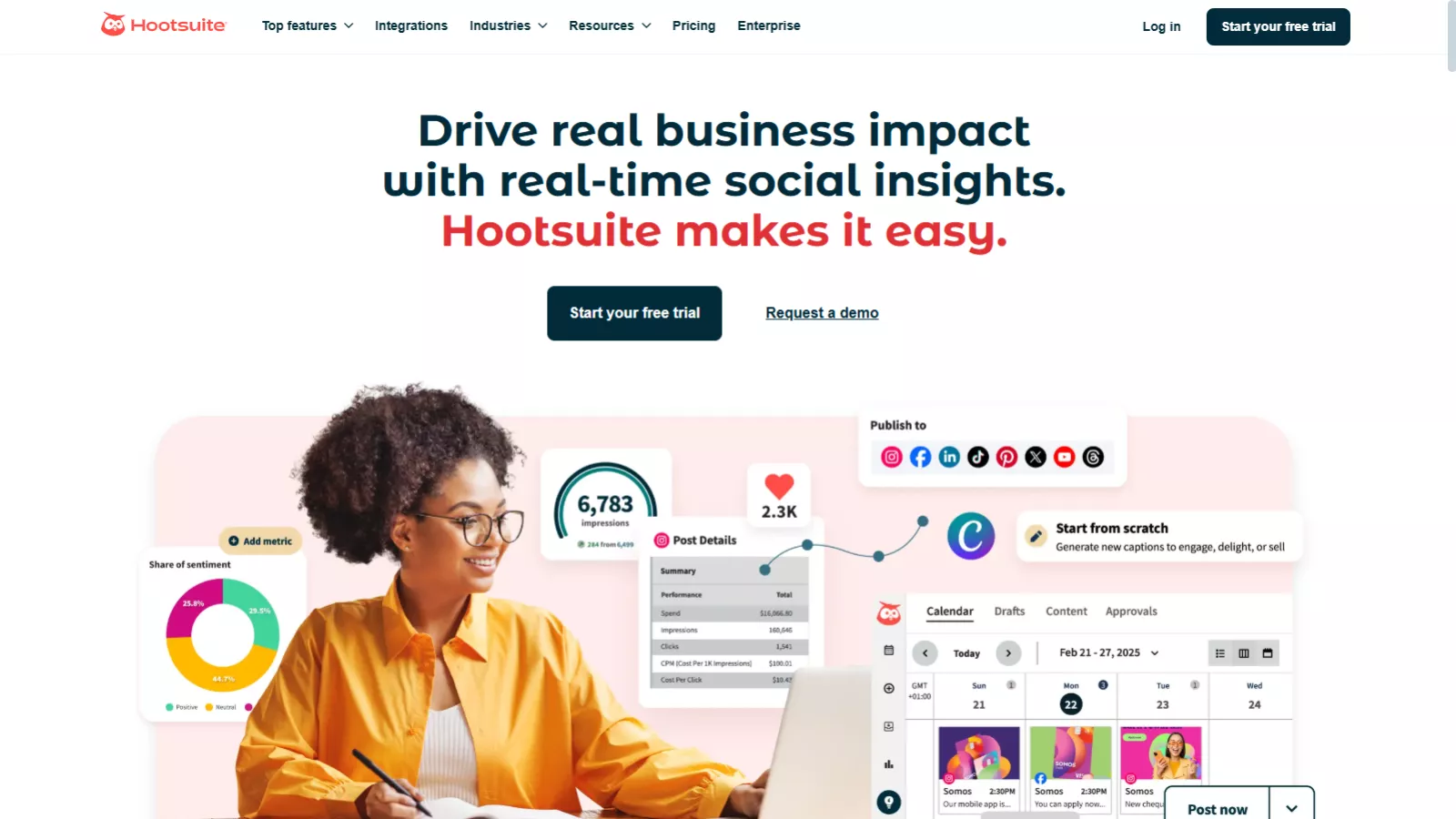
Hootsuite is a social media management platform designed to help individuals, businesses, and agencies manage multiple social media accounts from one dashboard. It supports major networks like Facebook, Instagram, LinkedIn, X (Twitter), YouTube, and Pinterest.
Instead of jumping between apps and tabs, Hootsuite centralizes scheduling, engagement, analytics, social listening, and even paid ad reporting. The goal is simple: save time while keeping social media efforts organized and measurable.
This Hootsuite software review focuses on real usability rather than feature lists alone.
Dashboard Experience: Powerful but Busy
The first thing you notice when you log into Hootsuite is the dashboard. Everything lives here—posts, analytics, streams, reports, and team workflows. For experienced social media managers, this setup makes sense. You can customize views, create streams for mentions or keywords, and monitor activity across platforms in real time.
However, for first-time users, the interface can feel overwhelming. There’s a noticeable learning curve, especially if you’re only looking to schedule posts and track basic engagement. Hootsuite clearly prioritizes power over simplicity, which works well for teams but may feel like too much for solo creators.
Scheduling and Content Planning
Scheduling is one of the main reasons people choose Hootsuite, and this is where the platform shines.
The content calendar lets you:
- Plan posts weekly or monthly
- Filter posts by platform or status
- Schedule content across multiple networks at once
- Get suggested best posting times based on engagement data
For social media managers handling several brands or clients, this visual planning system is extremely useful. It reduces guesswork and helps keep content consistent without manual reminders.
If scheduling is your primary need, Hootsuite delivers—but it may be more than you need if that’s all you’re looking for.
AI Caption Writer: Helpful but Not Perfect
Hootsuite includes an AI-powered caption generator designed to speed up content creation. You enter a topic, choose a tone, and the tool generates captions for you.
In practice, the AI works fine for:
- Quick Instagram or Facebook captions
- Placeholder copy when you’re short on time
- Basic promotional posts
That said, the output often feels generic. You’ll likely need to edit the captions to match your brand voice. It’s a time-saver, not a replacement for thoughtful copywriting.
Social Listening and Monitoring
One of Hootsuite’s strongest features is social listening. You can track brand mentions, keywords, hashtags, competitors, and industry conversations from a single interface.
The platform allows filtering by:
- Sentiment (positive, neutral, negative)
- Region and language
- Media type
- Platform
This is especially valuable for brands that rely on reputation management, customer feedback, or trend tracking. However, the volume of data can feel overwhelming at first. To use social listening effectively, you’ll need time to understand how to interpret and act on the insights.
For basic engagement tracking, this may feel excessive. For data-driven teams, it’s a major advantage.
Analytics and Reporting
Analytics is another area where Hootsuite clearly targets professional users.
The platform offers:
- Post performance tracking
- Engagement metrics
- Best-time-to-post insights
- Benchmarking against competitors
- Organic and paid ads reporting
Benchmarking is particularly useful if you want to see how your performance compares to competitors, but it does require connecting multiple accounts properly. Once set up, the reports provide a clear view of what’s working and what isn’t.
If analytics matter to your decision-making process, this part of the review Hootsuite experience stands out positively.
Also Read
Tailwind Review: Don’t Buy a Social Media Scheduler Until You Read This!!
Team Collaboration and Integrations
Hootsuite is built with teams in mind. Features like approval workflows, shared content libraries, and role-based access make collaboration easier for agencies and marketing teams.
On top of that, Hootsuite integrates with tools like:
- Canva
- Google Drive
- Dropbox
- Slack
These integrations help streamline content creation and communication, reducing back-and-forth between tools.
Hootsuite Pricing Review (Monthly & Annual Plans)
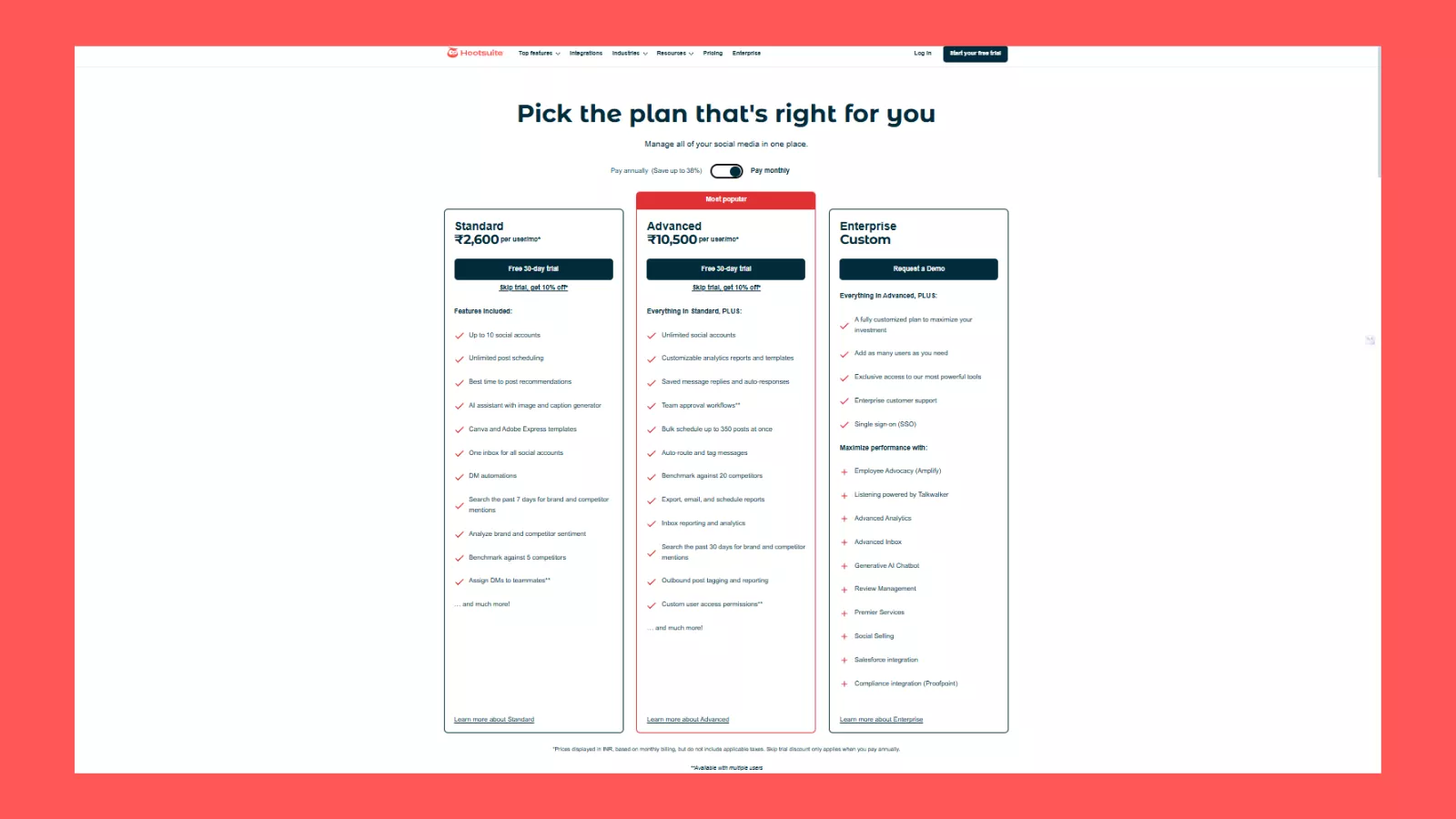
Hootsuite offers three pricing tiers—Standard, Advanced, and Enterprise—designed to scale with business needs. On monthly billing, the Standard plan starts at ₹2,600 per user/month, allowing up to 10 social accounts with unlimited scheduling, AI caption assistance, inbox management, and basic social listening. This plan works well for solo marketers and small businesses.
The Advanced plan, marked as the most popular, costs ₹10,500 per user/month on monthly billing. It removes account limits and adds deeper analytics, team approval workflows, bulk scheduling, competitor benchmarking, and advanced inbox reporting—making it better suited for growing teams and agencies.
For organizations choosing annual billing, pricing drops noticeably. The Standard plan falls to ₹1,915 per user/month, while the Advanced plan reduces to ₹7,540 per user/month, offering savings of up to 38%. Enterprise pricing is custom and targets large organizations needing SSO, advanced analytics, social listening, and dedicated support.
Overall, Hootsuite rewards long-term commitments but remains a premium-priced tool.
Pros and Cons of Hootsuite
What Hootsuite Does Well
- Centralized dashboard for multiple platforms
- Strong scheduling and planning tools
- Advanced analytics and benchmarking
- Social listening with sentiment analysis
- Excellent for team collaboration
Where It Falls Short
- Expensive compared to many alternatives
- Steep learning curve for beginners
- Interface can feel cluttered
- Overkill for simple scheduling needs
Best Alternatives to Hootsuite
If Hootsuite doesn’t fit your needs or budget, here are some excellent alternatives worth considering:
🔹 Buffer
A straightforward and affordable social media scheduler that’s ideal for solopreneurs and small teams who want simplicity.
🔹 Tailwind
Tailwind is a visual-first scheduler optimized for Pinterest and Instagram, perfect for creators focused on those platforms.
🔹 Sprout Social
Premium social media management with powerful analytics and team collaboration tools for larger marketing teams.
🔹 Agorapulse
User-friendly tool with a unified inbox and solid engagement features, balancing power and simplicity for agencies.
🔹 ContentStudio
AI-assisted content ideation and scheduling tool that helps teams generate and plan creative posts with ease.
Who Should Use Hootsuite?
Hootsuite makes sense if you:
- Manage multiple social media accounts or brands
- Work with a team that needs approvals and shared access
- Rely heavily on analytics and reporting
- Want social listening and competitor tracking
It may not be ideal if you:
- Only need basic post scheduling
- Are a solo creator on one platform
- Prefer a minimal, beginner-friendly interface
- Are working with a tight budget
In those cases, simpler tools like Buffer or Tailwind might be a better fit.
Final Verdict: Is Hootsuite Worth It?
This Hootsuite software review comes down to one simple truth: Hootsuite is powerful, but not for everyone.
If you can fully use its analytics, collaboration tools, and social listening features, the price can be justified. For agencies and brands managing complex social media operations, Hootsuite remains a strong option.
However, if your needs are basic, the platform may feel unnecessarily complex and expensive. In that case, you’re better off choosing a simpler, more affordable alternative.
Hootsuite isn’t trying to be the easiest tool—it’s trying to be the most comprehensive. Whether that’s worth it depends entirely on how much of the platform you actually plan to use.
Additional FAQs
1. Does Hootsuite support TikTok scheduling?
Yes, Hootsuite supports TikTok scheduling for business accounts, allowing users to plan and publish videos directly from the dashboard.
2. Can Hootsuite be used for personal social media accounts?
Hootsuite works best for brands and businesses, but individuals can use it if their social accounts meet platform requirements (especially for Instagram and TikTok).
3. Is Hootsuite safe and compliant with social media platform policies?
Yes, Hootsuite is an official partner of major platforms like Meta, LinkedIn, and X, ensuring compliance with API and security guidelines.
4. Does Hootsuite offer mobile apps?
Hootsuite has mobile apps for both Android and iOS, allowing users to schedule posts, respond to messages, and track performance on the go.